Tondeuse Télécommandé a base d'HoverBoard
Description
Mon projet consiste a hacker des hoverboard pour les utiliser en moteurs piloté par une RC.
Exemple : https://www.youtube.com/watch?v=eUR2SnJFujk
Des hoverboard d'occasions se trouvent facilement, mais comme moi je vais dans de la pelouse, j'ai recherché des hoverboard avec des grandes roues (8.5“)
Sinon on peu aussi prendre des HB (hovreboard) avec des roues de 6,5” puis changer les pneus avec des 200×50.
Donc je vais partir de 2 HB hacké pour avoir 4 roues motrices, fixé sur une planche, puis un moteur qui entraîne la lame de coupe.
L'avantage du hack est que l'on a les batteries avec (46V), mais pour la lame de coupe j'ai acheté un moteur 50W 24V, il me faudra faire un pack de batterie.
Il faut une télécommande RC avec son récepteur, j'ai trouvé une promo d'un modèle qui tiens dans une main. Mais le récepteur ne peut que faire du PWM, si c'était a refaire, je prendrais un récepteur qui soit en PPM.
Ensuite l'électronique se réduit aux connecteurs, Inter coup de poing et peut être une indication de charge des accus.
La mécanique reste le gros morceau, une imp 3D peut aider pour les fixations des moteurs et autres supports.
Matos
2x hoverboard d'occas.
1x moteur de coupe. (soit récup sur trottinette ou achat)
1x RC avec récepteur
Pack de batterie a base de 18650 (ou pas si récup)
Connecteurs divers
Inter coup de poing
Conception
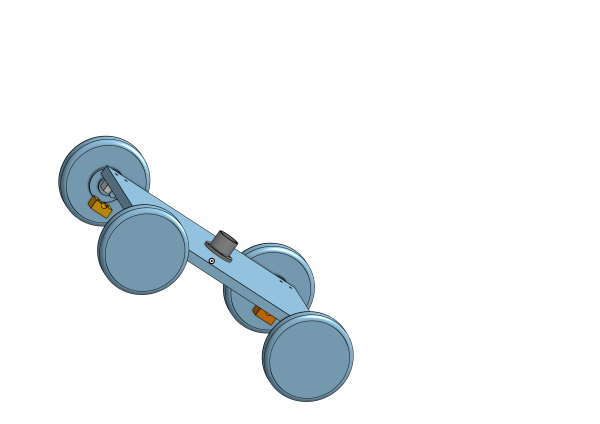
Pour me faire une idée de la bête voici un dessin onshape.
Pour l'instant, une planche avec des support pour les moteurs, les cartes et batteries seront sur la planche.
Reste a trouver un mécanisme pour pouvoir régler la hauteur de la lame de coupe.
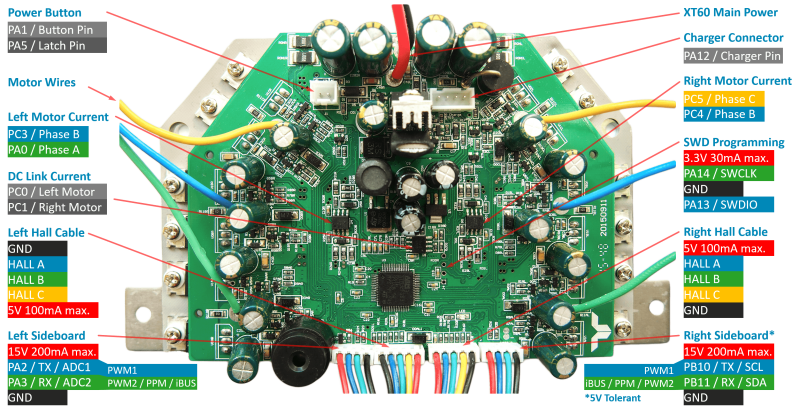
Pour Connecter le récepteur RC à la carte mère on prendra le dernier connecteur en bas à gauche.
De gauche à droite on a :
15V (coupé) 5V sur la carte -> V+
PA2 PWM1                    -> CH1 (gaz)
PA2 PWM2                    -> CH2 (direction)
GND                         -> GND
Pour trouver comment il faut câbler le St-link et le récepteur RC, je vous propose de voir les excellentes explications de tchangly21 sur youtub.
https://www.youtube.com/watch?v=hxwh_wvMX74
Programmation
On branche le ST-link V2
Il nous faut les programmes St-link ou openodc
https://github.com/stlink-org/stlink
https://github.com/stlink-org/stlink/releases
https://repo.or.cz/openocd.git
Mon OpenOCD utilise probablement le nouveau driver ST-Link natif, pas l’ancien mode HLA (hla_swd).
donc on utilise interface/stlink-dap.cfg qui se trouve dans /usr/share/openocd/scripts/interface/
Test avec :
st-info --probe
Found 1 stlink programmers
  version:    V2J37S7
  serial:     130065000400004E3757574E
  flash:      262144 (pagesize: 2048)
  sram:       65536
  chipid:     0x414
  dev-type:   F1xx_HD
Mon MCU est bien un :
  STM32F1 High Density
  Chip ID 0x414
  probablement un STM32F103ZE/ZET6 512 KB
On lance :
openocd -f interface/stlink-dap.cfg -f target/stm32f1x.cfg
Puis dans un autre shell :
telnet localhost 4444

> init
> reset halt
Si on trouve :
stm32x device protected
stm32x failed to erase options
C'est que le firmware est protégé il faut essayer :
openocd -f interface/stlink-dap.cfg -f target/stm32f1x.cfg -c "transport select swd" -c "adapter speed 10"
Mais ça bug !
openocd -f interface/stlink-dap.cfg -f target/stm32f1x.cfg -c “transport select swd” -c “adapter speed 10”
Open On-Chip Debugger 0.12.0+dev-01486-g4e9b167e1 (2026-05-07-06:35)
Licensed under GNU GPL v2
For bug reports, read
        http://openocd.org/doc/doxygen/bugs.html
Unexpected command line argument: select
Du coup on lance :
openocd -f interface/stlink-dap.cfg -f target/stm32f1x.cfg
puis
reset halt
stm32f1x unlock 0
Si on a :
stm32x unlocked.
INFO: a reset or power cycle is required
C'est gagné !
Ensuite on cherche un firmware, j'ai pris :
https://github.com/EFeru/hoverboard-firmware-hack-FOC
Sur conseil de chatgpt, il faut changer 2 3 truc dans Inc/config.h
Mais j'ai bataillé un moment avant de comprendre que le :
#define CONTROL_PWM_LEFT 0 // use RC PWM as input on the LEFT cable. Number indicates priority for dual-input. Disable DEBUG_SERIAL_USART2!
définissait le connecteur gauche et non pas le fils gauche du connecteur !
Il faut donc décommenter le LEFT et commenter le :
//#define CONTROL_PWM_RIGHT
Cela m'a fait essayé plusieurs firmware, au final j'ai terminé avec celui ci mais le premier doit fonctionner :
https://github.com/jebc/hoverboard-firmware-hack-FOC-pwmLR
Modification du Inc/config.h
Il faut décommenter :
#define VARIANT_PWM // Variant for RC-Remote with PWM Signal
1. Vitesse maximale — N_MOT_MAX
// Ligne 156 — actuellement :
#define N_MOT_MAX       1000   // [rpm]
// Exemple pour réduire de moitié :
#define N_MOT_MAX       500    // [rpm]
2. Rampe d'accélération — DEFAULT_RATE
C'est le paramètre principal pour un démarrage doux. Plus la valeur est basse, plus la montée en vitesse est lente.
// Ligne 189 — actuellement :
#define DEFAULT_RATE    480    // = 30.0 * 2^4
// Plus doux (exemples) :
#define DEFAULT_RATE    160    // ~10.0  → très progressif
#define DEFAULT_RATE    240    // ~15.0  → bon compromis
#define DEFAULT_RATE    320    // ~20.0  → légèrement adouci
3. Filtre d'entrée — DEFAULT_FILTER
Lisse les variations brusques du signal PWM de ta RC. Plus la valeur est basse, plus c'est mou.
// Ligne 190 — actuellement :
#define DEFAULT_FILTER  6553   // = 0.1
// Plus lissé :
#define DEFAULT_FILTER  3276   // = 0.05  → répond plus lentement aux coups de stick
4. Deadband (zone morte au neutre)
Si les moteurs démarrent légèrement sans que tu touches les sticks, augmente la deadband dans PRI_INPUT1/2 :
// Actuellement (dernier chiffre = deadband) :
#define PRI_INPUT1   3, -1000, 0, 1000, 100
#define PRI_INPUT2   3, -1000, 0, 1000, 100
 // Deadband plus large :
#define PRI_INPUT1   3, -1000, 0, 1000, 150
#define PRI_INPUT2   3, -1000, 0, 1000, 150
Puis dans :
// ################################# VARIANT_PWM SETTINGS ##############################
#ifdef VARIANT_PWM
/* ###### CONTROL VIA RC REMOTE ######
 * Right sensor board cable. Connect PA2 to channel 1 and PA3 to channel 2 on receiver.
 * Channel 1: steering, Channel 2: speed.
*/

  // #define DUAL_INPUTS                     // ADC*(Primary) + PWM(Auxiliary). Uncomment this to use Dual-inputs
  #ifdef DUAL_INPUTS
    #define FLASH_WRITE_KEY       0x1105  // Flash memory writing key. Change this key to ignore the input calibrations from the flash memory and use the ones in config.h
    #define CONTROL_ADC           0       // use ADC as input. Number indicates priority for dual-input. Disable CONTROL_SERIAL_USART2, FEEDBACK_SERIAL_USART2, DEBUG_SERIAL_USART2!
    #define CONTROL_PWM_RIGHT     1       // use RC PWM as input on the RIGHT cable. Number indicates priority for dual-input. Disable DEBUG_SERIAL_USART3!
    #define PRI_INPUT1            3,     0, 0, 4095,   0  // TYPE, MIN, MID, MAX, DEADBAND. See INPUT FORMAT section
    #define PRI_INPUT2            3,     0, 0, 4095,   0  // TYPE, MIN, MID, MAX, DEADBAND. See INPUT FORMAT section
    #define AUX_INPUT1            3, -1000, 0, 1000, 100  // TYPE, MIN, MID, MAX, DEADBAND. See INPUT FORMAT section
    #define AUX_INPUT2            3, -1000, 0, 1000, 100  // TYPE, MIN, MID, MAX, DEADBAND. See INPUT FORMAT section
  #else
    #define FLASH_WRITE_KEY       0x1006  // Flash memory writing key. Change this key to ignore the input calibrations from the flash memory and use the ones in config.h
    #define CONTROL_PWM_LEFT      0       // use RC PWM as input on the LEFT cable. Number indicates priority for dual-input. Disable DEBUG_SERIAL_USART2!
    //#define CONTROL_PWM_RIGHT     0       // use RC PWM as input on the RIGHT cable. Number indicates priority for dual-input. Disable DEBUG_SERIAL_USART3!
    #define PRI_INPUT1            3, -1000, 0, 1000, 100  // TYPE, MIN, MID, MAX, DEADBAND. See INPUT FORMAT section
    #define PRI_INPUT2            3, -1000, 0, 1000, 100  // TYPE, MIN, MID, MAX, DEADBAND. See INPUT FORMAT section
  #endif

  #define FILTER                  3270    // 0.1f [-] fixdt(0,16,16) lower value == softer filter [0, 65535] = [0.0 - 1.0].
  #define SPEED_COEFFICIENT       16384   // 1.0f [-] fixdt(1,16,14) higher value == stronger. [0, 65535] = [-2.0 - 2.0]. In this case 16384 = 1.0 * 2^14
  #define STEER_COEFFICIENT       16384   // 1.0f [-] fixdt(1,16,14) higher value == stronger. [0, 65535] = [-2.0 - 2.0]. In this case 16384 = 1.0 * 2^14. If you do not want any steering, set it to 0.
  // #define INVERT_R_DIRECTION
  // #define INVERT_L_DIRECTION
  // #define SUPPORT_BUTTONS_LEFT            // use left sensor board cable for button inputs.  Disable DEBUG_SERIAL_USART2!
  // #define SUPPORT_BUTTONS_RIGHT           // use right sensor board cable for button inputs. Disable DEBUG_SERIAL_USART3!

  #if defined(CONTROL_PWM_RIGHT) && !defined(DUAL_INPUTS)
//    #define DEBUG_SERIAL_USART2           // left sensor cable debug
  #elif defined(CONTROL_PWM_LEFT) && !defined(DUAL_INPUTS)
    #define DEBUG_SERIAL_USART3           // right sensor cable debug
  #endif
#endif
// ############################# END OF VARIANT_PWM SETTINGS ############################
Puis make clean au cas où
make
pour programmer :
reset halt
program /home/pat/ownCloud_pat/Projets/Divers/Tondeuse/hoverboard-firmware-hack-FOC/build/hover.elf verify reset exit
On remarque qu'il faut mettre le chemin complet ! Sinon il ne trouve pas le fichier.
telnet localhost 4444
Trying 127.0.0.1...
Connected to localhost.
Escape character is '^]'.
Open On-Chip Debugger
> reset halt
[stm32f1x.cpu] halted due to debug-request, current mode: Thread
xPSR: 0x01000000 pc: 0xfffffffe msp: 0xfffffffc
>program /home/pat/ownCloud_pat/Projets/Divers/Tondeuse/hoverboard-firmware-hack-FOC/build/hover.elf verify reset exit
[stm32f1x.cpu] halted due to debug-request, current mode: Thread
xPSR: 0x01000000 pc: 0xfffffffe msp: 0xfffffffc
** Programming Started **
device id = 0x13090414
flash size = 256 KiB
Adding extra erase range, 0x080078a4 .. 0x08007fff
** Programming Finished **
** Verify Started **
** Verified OK **
** Resetting Target **
shutdown command invoked
Connection closed by foreign host.
Gros bip Yep !
 )
)


